
To set up ChatGPT Business Hub, sign in at chatgpt.com/business-hub, claim your business, verify it with a DNS record on your website domain, pass an identity check, then complete your profile and invite your team or agency. OpenAI opened it in beta on 10 November 2026. We claimed ClickedOn's profile that week and finished setting up two clients this week. This guide is the checklist we now work from.
It is written for marketing leads and business owners in Australia who want OpenAI's own numbers on how often ChatGPT refers to them. If you already work with a GEO agency, the steps also show which parts only you can do and which parts to hand over.
What is ChatGPT Business Hub?
Business Hub is the dashboard for Businesses in ChatGPT, OpenAI's programme for managing how a business appears in ChatGPT. It lives at chatgpt.com/business-hub and in the ChatGPT sidebar. In our account it has three areas:
- Overview: your profile details and Insights, which reports mentions, profile views, website clicks and discovery topics.
- Agent builder: a business agent that answers customer questions. OpenAI's setup guide says agents are for eligible ecommerce and online service businesses in the US.
- Products: a product feed with prices and availability, for businesses that sell products.
OpenAI says you do not need an Ads account or a ChatGPT Enterprise agreement to claim an eligible business. It also says claiming does not guarantee more visibility. You get accurate details and first-party data. You do not get a ranking lever.
What do you need before you start?
Four things, and the second is where most setups stall:
- A ChatGPT account the business owns. Use a work login, not a personal one and not your agency's.
- Access to your domain's DNS settings, or the name of the person who has it. Often that is IT or your web host, not marketing.
- Photo ID and a device with a camera, for the person making the claim.
- Your official business details: legal name, address and registration number, written the way they appear on your records.
How do you set up ChatGPT Business Hub, step by step?
Step 1: Decide which account will own the profile
Choose this before anyone clicks anything. OpenAI says invitations can depend on the account used to claim the business, and a profile claimed inside a ChatGPT workspace may only accept invitees from that workspace. We ask clients to claim with a work account they control, then invite us. That keeps ownership with the business, the same way we treat Search Console.
Step 2: Open Business Hub and find your business
Sign in to ChatGPT and go to chatgpt.com/business-hub. Search for your business or enter your website address, pick the matching listing and confirm the account that will manage it. OpenAI notes that local stores and restaurants can currently claim only an existing US listing, so availability depends on your business type.
Step 3: Verify with your website domain
Business Hub offers a few verification methods depending on the business: phone, business email, website domain or Shopify. We used the website domain each time. ChatGPT shows a TXT record, and whoever manages your DNS adds it. Copy the type, host and value exactly.
Neither the marketing team nor the agency can do this step without DNS access. Send the record to the right person on day one, with a line explaining what it is for.
Step 4: Select Verify domain
Once the record is live, go back to ChatGPT and select Verify domain. DNS changes can take time to appear, so a failed first check is normal.
Here is the trap we hit on our own profile. Each new verification attempt issued a new code, and the TXT value has to match the code on screen at that moment. If someone restarts the claim after sending the first record to IT, the old record will never verify. Check the value on screen against the value in your DNS before you try again.
Step 5: Complete the identity check
After the claim is approved, OpenAI asks the person claiming to verify their identity through Persona. Ours needed a driver's licence and a live camera check. OpenAI says it may also ask for business registration details and proof that you are authorised to represent the business. The blue verified badge appears once this is approved.
One caution for agencies. OpenAI says approval automatically publishes a new profile, and a published profile cannot be deleted. Get the client's sign-off on the details before this step.
Step 6: Complete your profile
Add your category, description, opening hours, logo and photos. Two limits we found on our own profile: it accepted one category only, and the description stops at 300 characters. Ours was cut off without a warning the first time, so write to the limit and read it back after saving. OpenAI reviews changes before they publish, and updates can take time to show in answers.
Step 7: Invite your team or agency
Select Invite at the top of the Overview page and add each person as a business admin, using their own ChatGPT login. For one client it took ten days from sending these steps to seeing their data in our login. OpenAI says review times vary, so start early.
What does Business Hub Insights show?
Insights reports on the last 7 or 28 days. It shows mentions, profile views and website clicks, plus your top five discovery topics with a mention count and topic share for each.
Here is ClickedOn's own profile for the 28 days to 24 November 2026: 122 mentions, 2 website clicks and no profile views. Two topics made up almost all of it. "Business vendors and service comparisons" had a 59.0% share and "Local service providers and comparisons" had 35.9%.
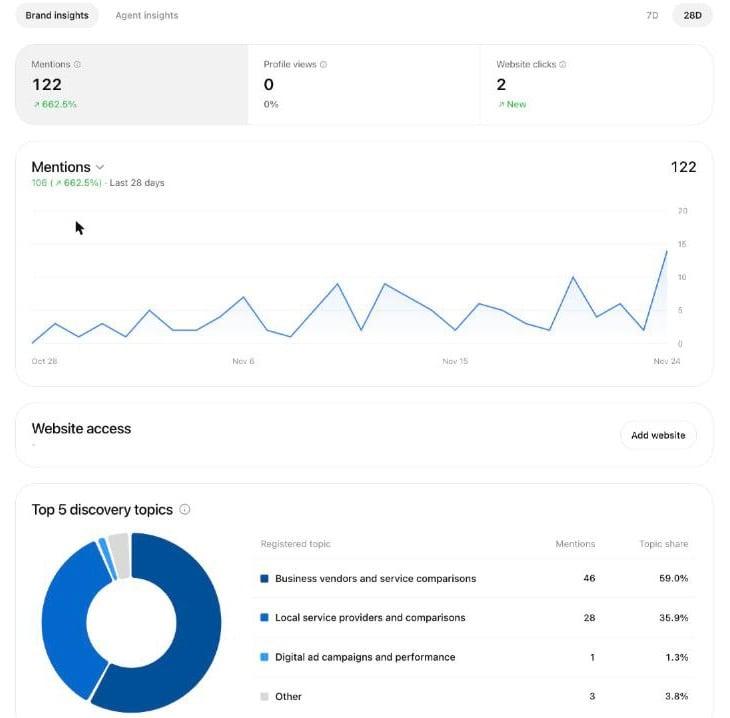
Two things stand out. People mostly meet us in ChatGPT when they are comparing providers, which matches the category and comparison prompts we track. And 122 mentions produced 2 clicks. If you judge AI search on website traffic alone, you will miss most of what is happening. That gap is why we report brand citations in AI answers as well as visits.
How should you read the numbers?
Use OpenAI's definitions, because they are narrower than they look:
- A mention, for an online business, counts when ChatGPT references your website. The brand name alone does not count. For a local business, it counts when ChatGPT shows a result for that location.
- Website clicks are clicks on links to your site inside ChatGPT. They are not sessions or leads, so reconcile them with AI referral traffic in GA4.
- Discovery topics are themes across answers that cited you. They are not prompts, and you will not see what people typed.
- A blank metric can mean activity is below OpenAI's reporting threshold, or data is still being collected. It does not mean zero.
Business Hub also shows only 7 and 28 days in our account. Log the numbers each week if you want a longer trend line.
What can Business Hub not do?
It will not make ChatGPT recommend you. OpenAI says claiming gives you no direct control over ChatGPT's independent answers, and that advertising does not influence them either.
It covers one platform. Google AI Overviews, Perplexity, Gemini and Copilot need their own tracking. It also says nothing about competitors or about what ChatGPT says when it names you. You still need a fixed prompt set, run on a schedule, to see that. Our guide to briefing an agency for AI search covers how to write one.
One part of our own setup is still open. The profile is verified and Insights works, but adding our website under Website access has stalled on OpenAI's side, and a product feed needs that step first. It is a beta, so expect a rough edge or two.
How we use it for clients
Once a client invites us, Business Hub becomes one more source in the weekly work, beside Search Console and our own prompt tracking. Each week we log mentions, clicks and discovery topics. Then we compare the topics with the prompts we track. A topic with plenty of mentions and no matching prompt is a gap in the prompt set. A prompt we care about with no matching topic usually means the content is not there yet.
The numbers go into the monthly report next to enquiries, so the client can see whether visibility in ChatGPT is moving with the commercial result.
Frequently asked questions
Is ChatGPT Business Hub available in Australia?
Yes, for businesses that meet OpenAI's eligibility rules. We have claimed profiles for Australian service businesses with a website. OpenAI says availability depends on location and business type, and that local stores and restaurants can currently claim only an existing US listing.
Do you need a paid ChatGPT plan or an ads account?
OpenAI says you do not need an Ads account or a ChatGPT Enterprise agreement to claim an eligible business. Claiming a profile, publishing an agent and advertising are separate steps.
Does claiming your business make ChatGPT recommend it more often?
No. OpenAI says claiming does not guarantee increased visibility or give you direct control over ChatGPT's recommendations. It lets you supply accurate details and see aggregate data on mentions, clicks and topics.
How long does ChatGPT Business Hub setup take?
The hands-on work is short. The waiting is the DNS record and OpenAI's reviews. For one client it took ten days from sending the steps to seeing data, and OpenAI says review times vary.
Can an agency manage Business Hub for you?
Yes. The admin who claimed the business can invite teammates and grant an agency access. Claim the profile under an account your business owns first, so the profile stays with you if the agency changes.
What counts as a mention in ChatGPT Business Hub?
For an online business, a mention counts when ChatGPT references your website. Naming the brand alone does not count. For a local business, it counts when ChatGPT shows a result for that location, even if nobody opens it.
Key takeaways
- Setup is seven steps: choose the owner account, find the business, verify by DNS, confirm the domain, pass the identity check, complete the profile and invite your team.
- The DNS record is the bottleneck. Find the person who manages your domain before you start.
- Claim under an account your business owns, then invite your agency as an admin.
- Insights shows mentions, profile views, website clicks and discovery topics for 7 or 28 days. Log them weekly to build a trend.
- A mention means ChatGPT referenced your website, and topics are themes, not prompts.
- Claiming does not improve your placement. It gives you accurate details and OpenAI's own data.
Where to start
Claim your profile this week. The hands-on work is short, and the only outside help you need is one DNS record. Our own chart included days from before we claimed the profile, so you may not be starting from zero.
Then find out how the other AI platforms treat your brand. Our free AI Visibility Audit gives you an estimated benchmark across ChatGPT, Claude, Gemini, Perplexity and Copilot. If you would like us to set up Business Hub and fold it into a full AI search programme, get in touch.